Monday, January 24, 2022

Rhythm games I played recently

Hatsune Miku Project Mirai DX (3DS)

Chibi Miku cuteness overload. Cures depression. Electric Chair Parody is so funny.

Rhythm Heaven (3DS)

It is like those satisfying animations turned into Rhythm game. I haven't finished it, but it is really fun during train commute. Challenging too.

Beat Saber (PCRV)

Second best VR game I've played. The best VR game is probably Moss. Played on Quest 2 connected to PC via Air Link/Link Cable. Hit blocks using light sabers to the electronic music. Can install custom music too-from beatsaver.com

Step Mania (PC)

Sweat like crazy, tired legs, just this one last song. Got a cheap DDR dance pad from Shopee for RM30. Can download many songs especially anime themes from stepmaniaonline.net


Tuesday, June 25, 2019

Review recent games I've played

Would like to review some of the most recent games I played.

Nier Automata (PC)
Really good game. Its an action RPG in post apocalypse setting. You play as robots fighting robots.
Graphics, story, music and game play are all good.
Only downside is you need to get the settings correct for PC or else it the game crashes.

Final Fantasy XIII series (PC)
The first game is walking through a straight hallway and repeatedly hitting auto attack. It had the most boring side quests. I was asleep most of the time. There were no towns. Only good thing are their beautifully rendered cut scenes which only last a few minutes. Not sure how I managed to finish it. The story is about how a fal'Cie (some kind of deity) wants to kill himself, so you and your party set out to kill him, effectively causing Cocoon (your home world) to become frozen, weird plot.

The second game was much better than the first. It lets you time travel and go back to different locations after you altered the past, i.e. the side quest were alright. You control Serah, Noel and you can select the third character to be any monster that you've captured. I think graphics, story, music and gameplay were best among the three games. Battles are faster than the first game. The final boss was crazy, kept switching paradigms and still dying continuously, it was a good challenge. I didn't like the plot twist at the ending, I was expecting a reward but got an advertisement for the next game instead. And you have a Moogle companion.

The third was worse than the second but better than the first. It had the worse story, its anti-religion and anti-god theme was much stronger than what FFX had. Graphics, music and game play were average. The story is about how everybody is sad that the world was destroyed/going to be destroyed.

Final Fantasy XV (PC)
This game is full of dark scary caves and imps that jump scare at you. Worse part is if you're low leveled, you won't die because you have alot of potions, you'll simply go through the nightmare at a slower pace. There are also giant snake head creatures. Luckily, there is classic FF music that can be enabled through the radio player, making the caves less scary. The side quests were really bad, generic fetch quests. Car trips are boring. Towards the end, the game reveals that you were actually playing Resident Evil. Overall, boring game.

World of Final Fantasy (PC)
I didn't finish it because I felt bored and stopped playing once I arrived at Midgar.

Bravely Default & Bravely Second (3DS)
Really good game. It is a turn-based RPG game with a twist. The brave and default system needs abit of thinking to win. Story is about awakening the crystals to save the world. It has really good job and weapons system that lets your characters become anything. There are strategies towards the end game which is almost cheating (Ninja + High Jump), which is fun. Story, music and game play were good. Graphics were average chibi styled like in FFIX.

Town of Salem (Web)
Mafia/Warewolf type game that you played at parties. It seems to rely alot more on facts and logic  than other Mafia/Warewolf type game that rely on body language or talking behaviors. Like if you role blocked someone and there were no kills, most likely your target is suspicious. Or if the doctor is dead, but someone accidentally claims to be a doctor, he is most likely suspicious or they might be jester.

Opus Magnum (PC)
Quick fun beautiful puzzle game. It reminds me of programming a little where you create a set of recursive instructions in order to form colorful shapes. It lets you export the solutions into animated gif images too. It gets abit stressful at the later levels.

Shadow Tactics: Blades of the Shogun (PC)
Interesting puzzle game. It is a top down stealth/RTS game. Each character is fun to play, you have a ninja, samurai, kid, sharpshooter and geisha. You need to plan and sneak about the map, coordinate between the characters to defeat the enemy. The ending is a little bit underwhelming, it just lets you kill the final guy then everybody goes back to their normal lives.

Banished (PC)
I didn't managed to finish this game, basically it is about resource management, manage the town folks to survive, and building the city. Doesn't seem to have any story or end game, just keep building. It was kind of fun in the first few minutes.

Frost Punk (PC)
Similar to Banished, resource management to survive and city building, but is has an end game at around 30 days when everything becomes freezing cold. Really nice winter theme and graphics. Kept failing the first few attempts, needed to allocate more manpower to research at the start of the game. Sometimes you have to set laws for your citizens to work long hours making them a little bit unhappy in order to survive the cold. Really additive until I won, after which there is not much to do post game.

Factorio (PC)
Really addictive factory building game. It has a procedural generated map. The starting is similar to Minecraft of getting some wood and coal and smelting iron. Then it escalates to conveyor belts, coal powered drills, oil pumps, assembling machines, trains and construction robots. The end game is to construct a space shuttle in order to leave the alien planet. Its alot about figuring how to put together all the components together in order to exponentially automate all the resource gathering and crafting.

Apollo Justice (3DS)
This crime and law visual novel has alot of plot twists. Especially during the first and final chapter. The mystery kept the game engaging. Phoenix Wrights lost his attorney badge 7 years ago, then comes Apollo Justice.

Summary: Nier Automata was really good. Final Fantasy 13 series and 15 were bad. There are quite a number of good puzzle games released during the past few years.

Monday, December 31, 2018

Personal Finance - Investments

Been trying out different investment products lately, I'm still a beginner in most of these fields.

Equity Unit Trust Funds - It really depends on the KLCI overall market as well as the global economy if you've invested in funds with foreign exposure. I have personally lost 5% in the unit price movements on top of the initial 5% front load fee. So I lost about 10% of my investment over 9 months period. Been doing dollar cost averaging method but still making losses.

Money Market Unit Trust Fund - I've switched over from FD to this product since May18, it is giving average 3.6% per annum return with no fees and no minimum holding period. The only con I can think is that it takes a week for them to withdraw into your account. Overall, I think it is better than 1 month rolling FD. The other thing that can beat this product are those savings accounts giving 3.6% per annum if you maintain a minimum of RM50k.

P2P Lending - It is giving 12% per annum lending money directly to SMEs. The website claims that the default rate is only 1%, so you'll still earn if this rate remains consistent. The P2P platform will take a small cut upon repayment by borrower, in exchange, the platform reviews the risk of the investments. I only invested a little bit into this as it is quite new type of product.

Crypto Currency Mining - I bought a GTX 1080 TI Graphic Card back in Sep17 last year for RM3.5k, if I include the other computer components it came to a total about RM7k for the rig. I managed to withdraw RM2.5k from the crypto wallet for 12 months of mining. Mining became very much less profitable in Sep18. And the highest bid price for the graphic card is now RM2.2k. Initially I planned to recover the full cost of the rig within 2 years, but now it seems like I can only recover 35% of the cost. In the mean time, I'm just going to keep this rig because mining is not its only purpose.

Precious Metals - The best physical item to buy seems to be UOB's 1oz gold coin, it has a spread of 3-4% and it is only 4% above spot price. This is much lower compared to those at jewelry shops that sell 20% above spot. Second place seems to be Public Gold, Maybank's Kijang Emas or Canadian Maple Leafs from online retailers. It was Robert who kept preaching about precious metals that influenced me to invest in this. Along the way, I learnt to use MS Excel's Get Data from Web tool, it enables me summarise the prices from various sources into a single worksheet.

Saturday, May 5, 2018

ASNB Advertisements

I was at Maybank and I saw an ASNB advertisement and their consistent distributions of 6-8% per year. Looked attractive at first, but it took me a long time to realise that distribution does not equal return. ASNB has 2 types of funds - which are fixed priced and variable priced.

Fixed price will always be priced at RM1 per unit, but the actual value of the fund may be higher or lower depending on the value of the underlying companies that the fund invests in. For the past 3 years, funds investing in our Malaysian share market were not doing so well. When my Public Mutual fund was only making me 2-3% per annum for the last 3 years, I felt strange that ASNB's funds could deliver consistent 7% per annum. So I went to have a look at one of the annual report for ASNB's fixed priced fund. It turns out that the equity per unit of the fund is only RM0.70, hence the RM1 price tag makes that fund overpriced.

ASNB's variable priced funds aren't so bad, cause they at least are able to disclose their funds' returns along side the distributions. You see, in a good year, the performance of some funds have seen 20-30% growth while some years it may even make losses. For one of ASNB's variable priced funds, the distribution seems consistently positive every year, but the returns fluctuated like crazy.

Distribution is like taking what is rightfully yours, and saying that it is yours again. If someone gives you something that is already yours, its not giving, its just a trick, a marketing trick. It is the same concept for dividends given by companies, but difference is that dividends will reduce a company's capital, which is good when a company is not thinking much about expanding.


What matters more than distributions, I believe are the returns, which is dependent on the performance of the underlying companies that the funds invests in. Unfortunately, ASNB has chosen to emphasise on distributions instead of actual fund returns in their advertisements.

Sunday, June 25, 2017

8 ways to Optimize Microsoft Excel files

Excel can work unreasonably slow or the Excel file size may exponentially increase. Here are some ways I use almost everyday to make the file smaller and work faster.

1. Save in .xlsx format, avoid saving in .xls format. (Potentially save 10-50% of file size)

2. Try saving in .xlsb Excel Binary format. (Potentially save 10-20% of file size)

3. Delete all names in the name manager. Sometimes there are hidden names, look up google for the Macro to unhide the hidden names, then delete them. The reason the names exists maybe because of poorly written Macros which created alot of the names but these poorly written Macros never deletes them after use. (Potentially save 10-30% of file size, prevents name conflict error message when you copy an Excel worksheet)

4. Delete all objects (shapes, comments, text boxes, pictures). Press F5-->Special-->Objects. Then press delete. (May speed up the file loading time by 90%, Excel will feel smoother when scrolling through the sheet)

5. Delete empty rows and column. If the file size was unreasonably large at about 10-90MB, the file size may be reduced to only 1MB. (Potentially saving 10-99% of the file size)

6. Unmerge all cells. If Excel freezes while you are trying to unmerge, try unmerging each column one at a time. (Excel will feel smoother when scrolling through the sheet)

7. If you're dealing with huge amounts of data, about 300 thousand to 1 million rows of data, try encapsulating the entire data into a pivot table, delete the original data, and save it. Of course, do keep a backup of the original data. (Saves 80% of the file size, lets you filter analyse the data much faster, files takes 80% faster to load)

8. Open the excel file with WinZip/WinRAR and look for the component which is causing the huge file size. Sometime it could be a huge picture inside the file, or single sheet that is causing the file to be huge. Delete said culprit. (Potential saving vary depending on the circumstances)

Excel may be useful tool, but can really get out of hand if left uncontrolled, hope these methods can help you make the Excel file smaller and work faster.

Feel free to share other tips with me, I only learnt some of these ideas above a few months ago. There are always alot of information out there to share.

Sunday, March 19, 2017

View Facebook tagged photos, bypass private setting

Sometimes, certain people may make their tagged photos hidden. Here is a way to bypass that and view their tagged photos.

Search the person on facebook, click on the triangle and then click photos.


Alternatively, if there is no triangle to click on, then do the following:

1. Get the person's profile ID by going to the person's profile, right click anywhere and view source. Then Ctrl+F to find "profile_id".

2. Copy the profile ID and paste into this URL xxxxxxxxx

https://www.facebook.com/search/xxxxxxxxxx/photos-of

3. Done

4. Optional step: You can also filter by year example below.

https://www.facebook.com/search/xxxx/photos-of/2018/date/photos/intersect

Saturday, October 31, 2015

Excel General Ledger Part 3: Dropdown boxes

Utilising the data validation tool in excel, we can create dropdown boxes for our ledger. This can save time keying manually and increases accuracy.


1
Create a new sheet, name it "chartOfAccounts"


2
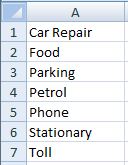
Populate the sheet with account names


3
Go back to your ledger sheet.

And select the accounts column.


4
Click on Data > Data Tools > Data Validation


5
Change the fields as follows:
Allow: List
Source: =chartOfAccounts!A:A


6
You might want to disable error alert by clicking on Error Alert and unchecking "Show error alert after invalid data is entered"


7
Now you can select any cell in the account column and a dropdown box will appear.


8
You can also do something similar for the date column to save time entering today's date.

Simply by creating a new sheet with the formula "=now()" and using data validation steps above.


Excel General Ledger Part 2: Filters

1

Select your table

Then click on Home > Sort & Filter >Filter


Alternatively, the shortcut is: Ctrl + A + A , then Alt, then A, then T


2

Triangle buttons will now appear on the first row of your table.

Click on any triangle and you'll see a list of check boxes to filter.

eg. If you want to filter by food, just uncheck "(Select All)" and check "Food".


Excel General Ledger Part 1: Pivot


1
Populate your ledger as follows:

Date Account Description Amount


2
Select the 4 Columns and click Insert>Pivot Table>Ok


3
Look at the PivotTable Field list on the right

Click and drag the "Account" field to the row labels box.

Click and drag the "Amount" field to the values box.

Click and drag the "Date" to the columns field

It should look something like this:


4
Look at the pivot table and right click on one of the dates

Then click on group and OK.


Tata, the dates should now group by months


5

Whenever you update entries in the ledger, remember to update the pivot table as follows:

Select any cell on the pivot table, click on options

And click on refresh.


6
If you want to zoom into an account, just double click the numbers in the pivot table and it will show a breakdown of that account

Sunday, October 25, 2015

How to download Youtube thumbnail picture

To download Youtube thumbnail image- Google Chrome Users: 

1
Ctrl+U 

2
Ctrl+F 

3
type og:image 

4
then copy link in Url Bar.

Merge and combine CSV files using command prompt

Just need to share this out, it lets you combine many csv files into one instead of manually copy and paste in Excel.


1
Open command prompt

2
Navigate to your folder using the following commands:

cd "<folder>"

eg.

cd C:\folder\


3
Then enter the following command which will combine all the csv files in the folder into one giant csv file:

copy *.csv combine.csv

* symbol means all

combine.csv is your destination file and you can name it anything you want.


Batch file renaming using power shell

About batch renaming of files, this code enables you to change things like eg. all spaces to underscore "_", or even roll forwarding years such as changing all "2014" to "2015".

1
Open windows power shell

2
Navigate to your folder using the following commands:

cd "<folder>"

eg.

cd C:\folder\

3
Then enter the command which replaces all the space with underscore "_"

Dir | Rename-Item –NewName { $_.name –replace “ “,”_” }

You can also customise accordingly. The following replaces all 2014 with 2015:

Dir | Rename-Item –NewName { $_.name –replace “2014“,”2015” }

Monday, November 5, 2012

Change screen resolution and desktop background with command prompt

Its been a few years since I wrote a useful post. Here is something I wanna and feel a need to share.

Me and my brother share the same computer, and we always have different preference for resolution and desktop background. This guide, I will tell you how I went about the problem. I'm gonna put one more on changing the theme after I've done googling. I'm on XP btw.

Every time I want to use the computer, I had to go through the tedious process of opening the display settings and so on. This amounts to many steps. 7 in total.

1.right click on desktop
2.click on properties
3.click on desktop tab
4.select desired bg
5.click on settings tab
6.slide to desired resolution
7.Ok


And I had to do this every time. So I created a simple batch file. With the batch file, I was able to reduce the 7 steps to 1 step.

It uses 2 third party software which are:

nircmd.exe
-by Nirsoft

SetWallpaper.exe
-by Marty List

They can be downloaded here:

http://www.optimumx.com/downloads.html#SetWallpaper
http://www.nirsoft.net/utils/nircmd.html

After downloading and packaging them, here is a sample batch file I made.

@echo off
cd /d C:\Downloads\
nircmd.exe setdisplay 1024 768 32 -updatereg
SetWallpaper.exe /D:S C:\WINDOWS\Web\Wallpaper\Bliss.bmp


Change "C:\Downloads\" to where you unpacked nircmd.exe and SetWallpaper.exe
Change the setdisplay parameter to weight height bitcolor
Change the path of the image (has to be .bmp format)
Save it to the desktop with .bat extension and you are done.

For more options, check out the Readme:

nircmd.exe setdisplay
http://www.nirsoft.net/utils/nircmd2.html#setdisplay
setdisplay {monitor:index/name} [width] [height] [color bits] {refresh rate} {-updatereg} {-allusers}

SetWallpaper.exe
Included in the download
/r to remove wallpaper
/D:C|T|S to make it centered, tiled or stretched

actually, this post may not be that useful


Thursday, October 6, 2011

New script for delete %20 in batch

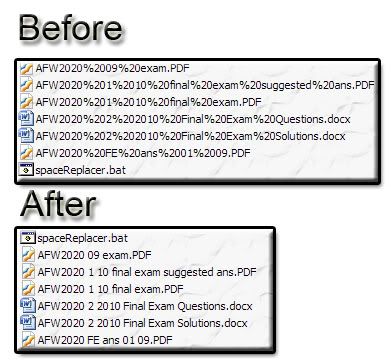
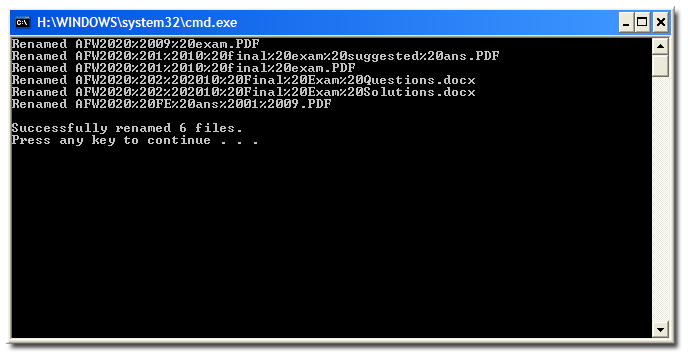
Now have added a few aesthetics by reporting the number of files renamed.


Warning: Use at own risk

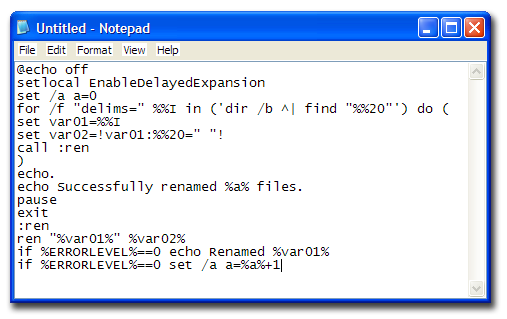
The script:


@echo off
setlocal EnableDelayedExpansion
set /a a=0
for /f "delims=" %%I in ('dir /b ^| find "%%20"') do (
set var01=%%I
set var02=!var01:%%20=" "!
call :ren
)
echo.
echo Successfully renamed %a% files.
pause
exit
:ren
ren "%var01%" %var02%
if %ERRORLEVEL%==0 echo Renamed %var01%
if %ERRORLEVEL%==0 set /a a=%a%+1

Instructions:
1. Copy the script above and paste into notepad

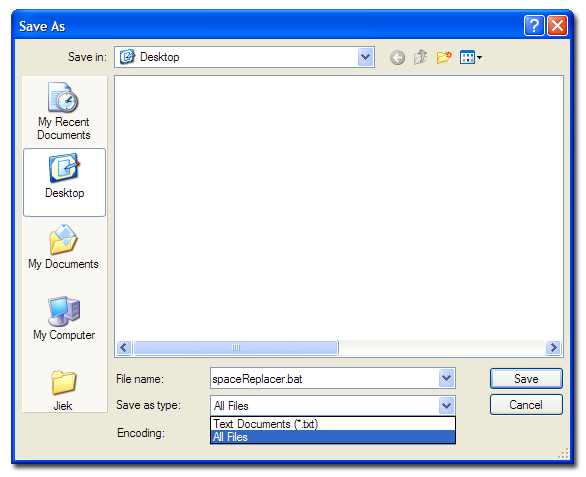
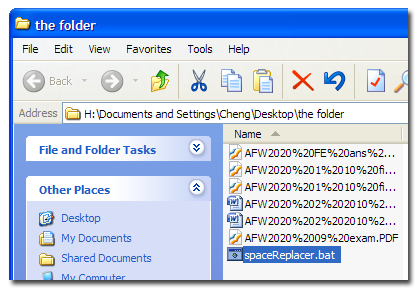
2. Save it as "spaceReplacer.bat", file type: All Type.

3. Put it in the same folder as the files with %20

4. and run

5. Success!